Desktop Guide
Rights And Safety
Track asset rights, safe music mode, platform warnings, and publish-prep reports.
What This Feature Does
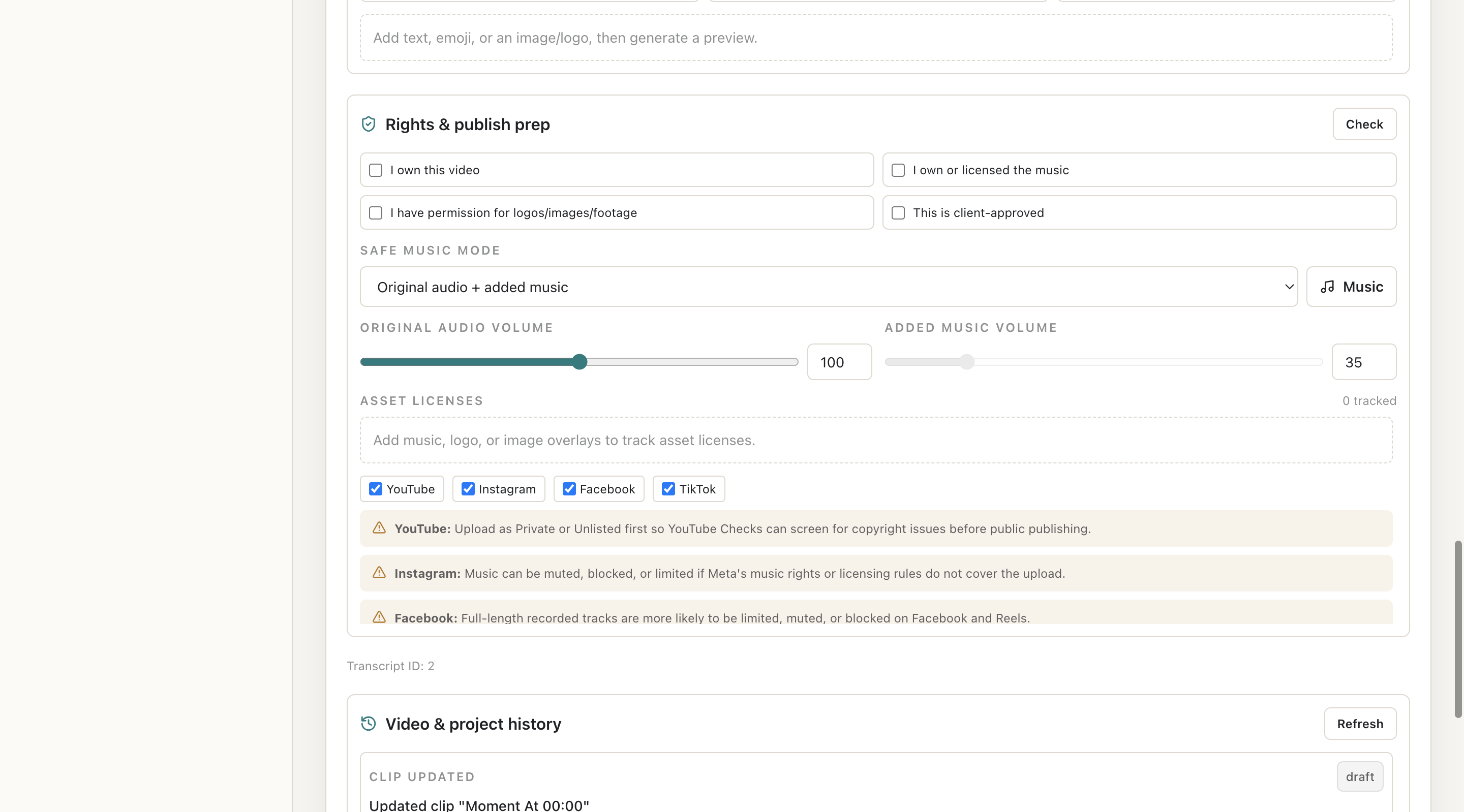
Rights And Safety includes checklist items, asset license tracker, safe music mode, platform warnings, JSON/PDF report state where available, and wording that avoids claiming guaranteed clearance.
Why Users Need It
Users need it before export or posting when content includes videos, music, logos, images, client materials, or platform-specific risk.
Where To Find It
Clip Editor -> Rights checklist; Publishing -> Warnings/report.
Before You Start
- Know asset ownership/license status
- Client approval where required
Step-by-Step Guide
- Open selected clip.
- Review rights checklist.
- Confirm video ownership/permission.
- Confirm music license.
- Confirm logo/image permission.
- Track unknown assets.
- Review platform warnings.
- Generate publish-prep report where available.
Screenshot Section
What To Check On The Screen
- Unknown assets are resolved
- Warnings are understood
- Reports use safe wording
Expected Result
User has a clear rights review state before export or manual posting.
Common Mistakes
- Using music without checking license
- Using client logo without permission
Troubleshooting
If export is blocked, resolve unknown asset licenses or remove unverified assets.